Keep the full story together
Place home and laboratory INR results beside the treatment, schedule, dose, and symptom records that give them context.
 INR Wizard
INR record keeping for iPhone
INR stands for International Normalised Ratio. It is a standardised way of reporting how long blood takes to clot. INR Wizard helps you keep home and laboratory results, clinician-provided schedules, actual dose records, and symptoms together.
Download on the App Store India · Free · iPhone · iOS 17 or later
INR, in plain language
Blood clotting is the body’s natural way of limiting bleeding after an injury. A prothrombin time, or PT, test measures how many seconds it takes a clot to form in a blood sample. The International Normalised Ratio turns that PT result into a standardised number, making results easier to compare across test methods. A higher INR usually means that the blood took longer to clot, but only the person’s healthcare team can interpret an individual result.
INR testing is commonly used to help a healthcare professional monitor Warfarin, an anticoagulant medicine. A sample may be taken from a vein in a laboratory or from a fingertip with a home meter. The result must be considered with the person’s condition, medicine, and clinician-provided target range.
Medical background: MedlinePlus PT/INR overview
From a vein or a trained fingertip test.
The PT test records how long a clot takes to form.
The result is reported on a comparable numerical scale.
INR Wizard records the value. It does not decide whether that value is safe or what medicine to take.
Why INR Wizard exists
INR care can involve readings from different places, changing written schedules, daily medication records, symptoms, and conversations with more than one clinician. INR Wizard aims to turn those scattered details into a clear patient-entered history.
Place home and laboratory INR results beside the treatment, schedule, dose, and symptom records that give them context.
Keep prescribed schedules separate from actual doses, including missed, skipped, changed, and uncertain entries.
Create a readable date-range report that can be reviewed with the appropriate healthcare professional.
The current iPhone interface
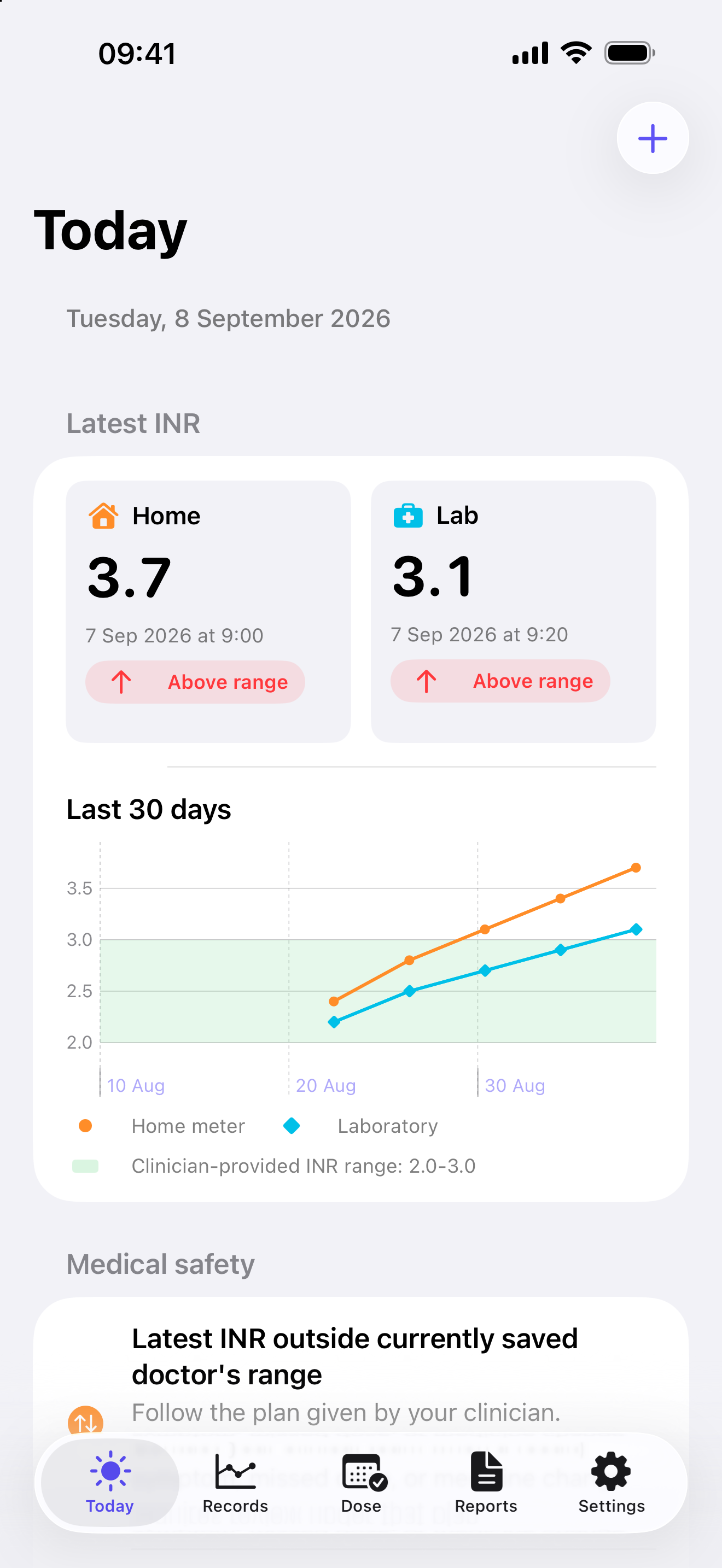
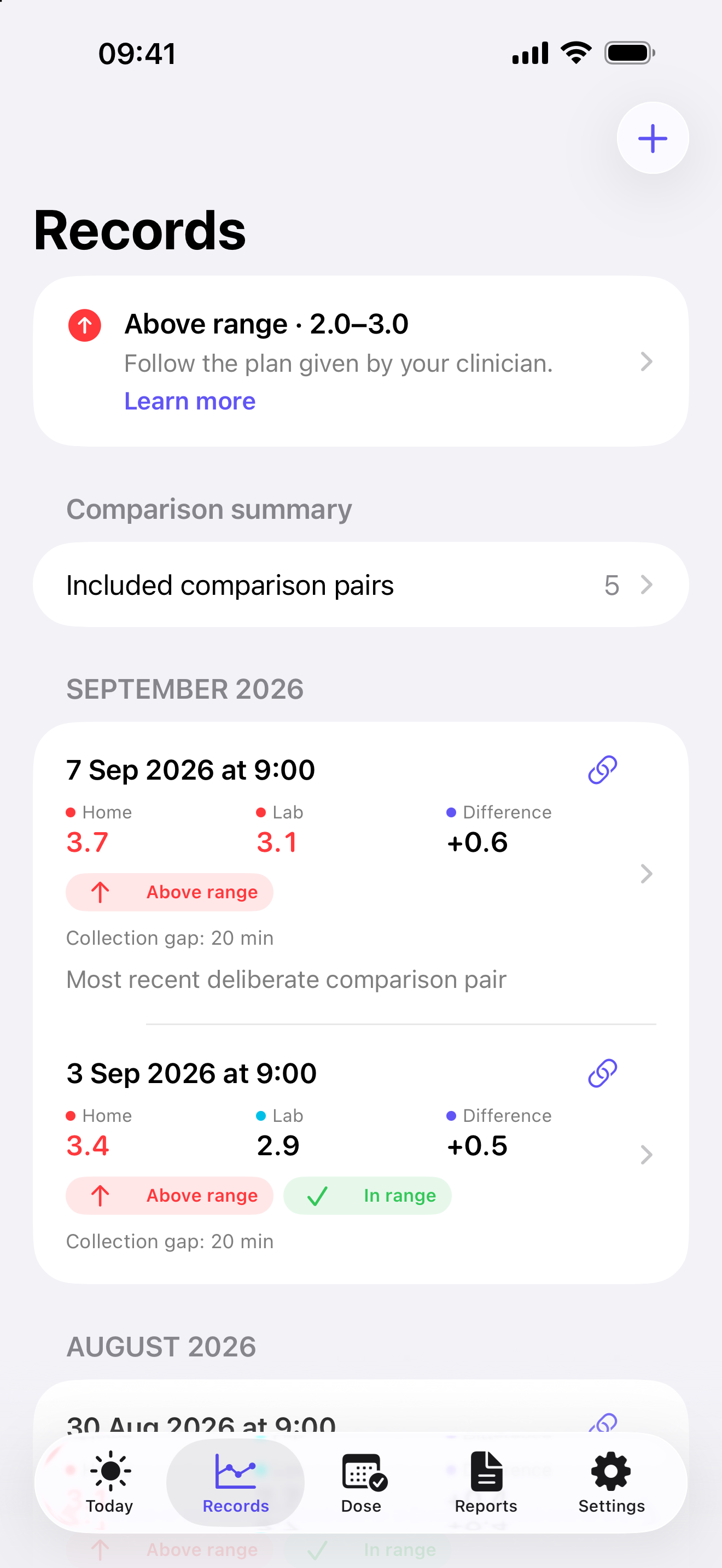
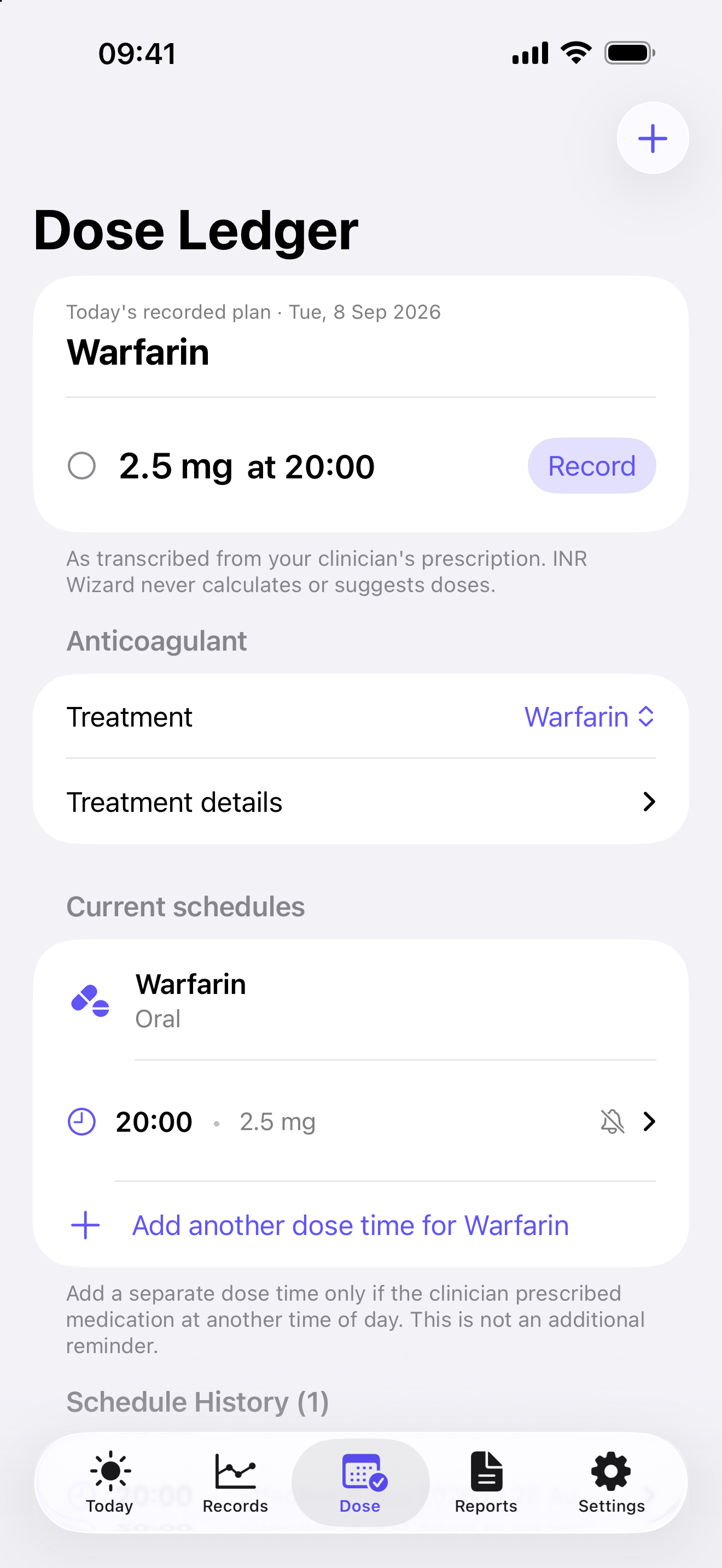
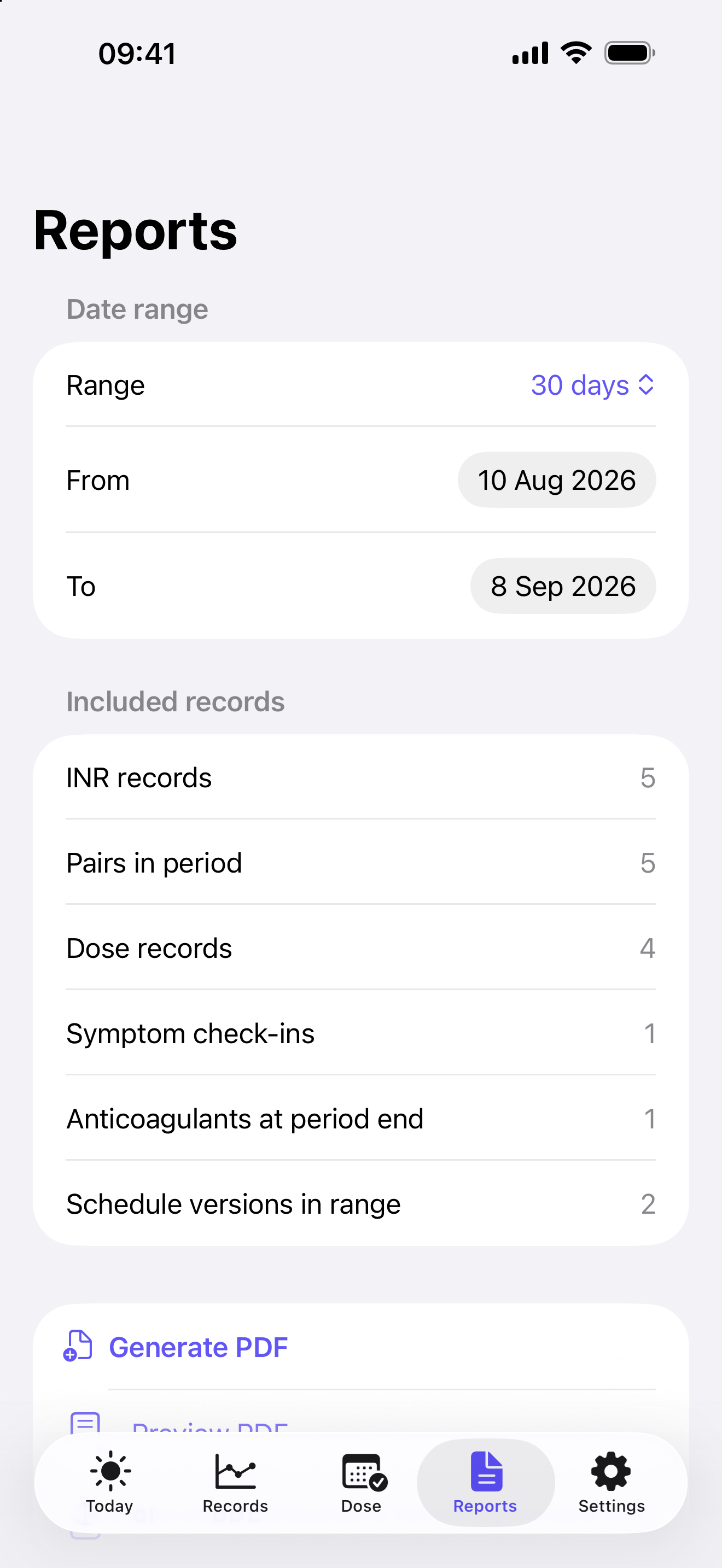
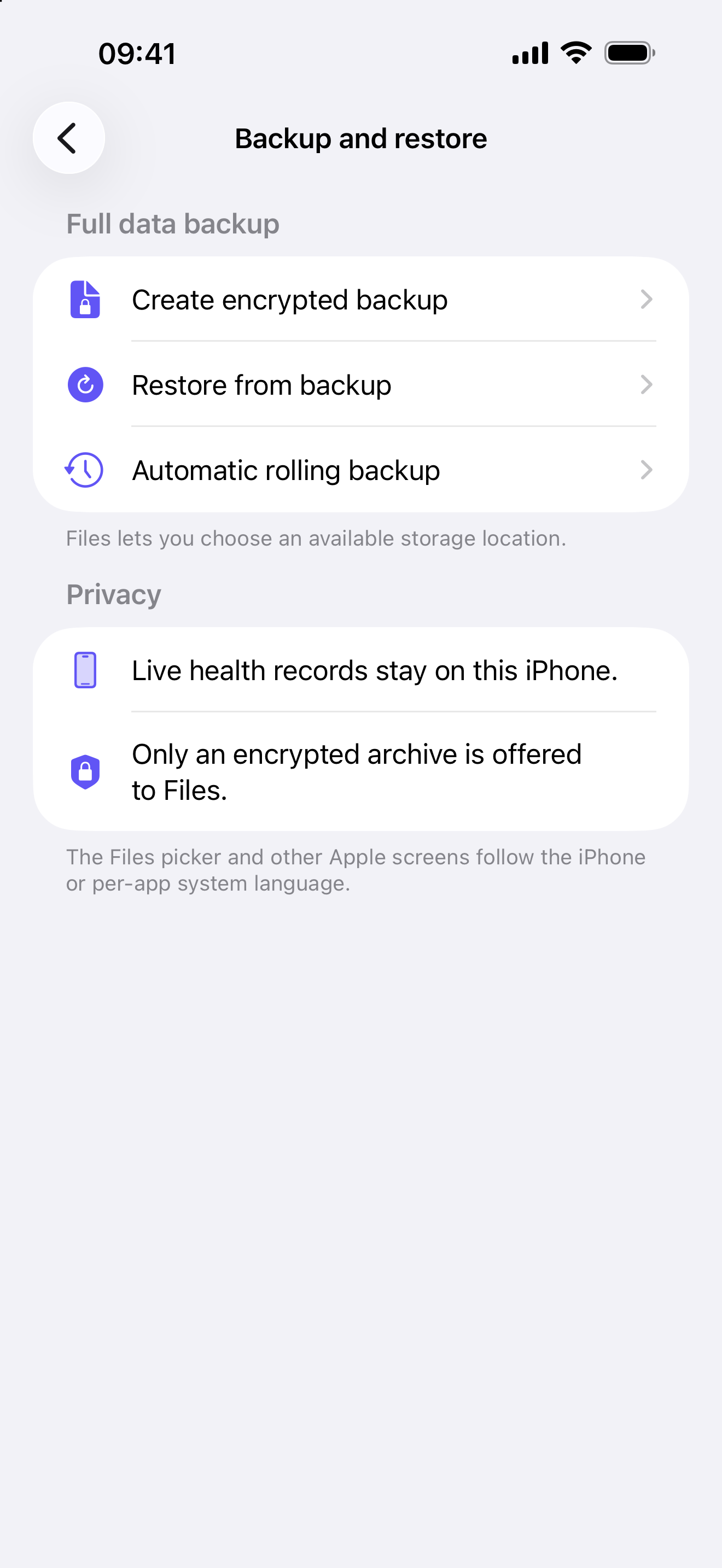
The current Version 1.0 interface brings the daily record, measured INR history, prescribed schedules, reports, and encrypted backup into one familiar iPhone experience. Every screen below uses fictional sample data.
A detailed patient journal
Each feature is designed to record information faithfully without turning the app into a treatment or dosing tool.
Record each result with its date and time, identify it as a home-meter or laboratory reading, add optional method details, and review the latest measured values in a 30-day trend on Today.
Plot explicitly paired readings and review signed numerical and percentage differences. After at least five eligible pairs with complete, consistent recorded method details, the app can show a provisional median summary. These are descriptive only—never a calibration, correction, “true” INR, or treatment guide.
Save the current lower and upper values provided by a clinician. Measured results outside that recorded range are highlighted in colour and text, with optional local alerts.
Keep date of birth, height, weight, multiple physicians, specialties, practices, and contact details together for personalised reports. BMI is calculated on the device.
Record medicine name, oral or injection route, prescriber, label strengths, dosage instructions, and treatment dates. INR Wizard never chooses a tablet combination.
Transcribe clinician-provided weekly schedules with each dose time. Revised or stopped schedules keep effective dates so earlier dose records remain understandable, including when more than one anticoagulant is recorded.
Choose notification delivery or, on a compatible iPhone with permission, Alarm delivery for a saved dose or INR-testing reminder. Notification dose reminders are Time Sensitive when permitted, not Critical Alerts. If alarm permission is not granted, the app explains the fallback and attempts notification delivery instead; delivery still depends on notification permission, iPhone settings, and iOS. Neither route records that a dose was taken.
Keep independent once, weekly, or multi-week reminder schedules for home and laboratory INR testing. Choose Notification or compatible Alarm delivery; INR Wizard does not choose a testing interval, record completion, or guarantee delivery.
Record today or an earlier date as taken, skipped, missed, or uncertain. Planned time, patient-reported time taken, later logging time, planned amount, and actual amount remain separate facts.
Use quick selections to record symptoms or injuries noticed while taking Warfarin. Urgent selections direct the user to professional or emergency help without making a diagnosis.
Choose 7, 30, or 90 days, or a custom range. Preview a report containing patient, clinician, INR, treatment, schedule, actual dose, and symptom information before sharing it.
Version 1.0 is in English. Patient-entered names, notes, and source text stay as typed. Apple-owned screens such as Files, Share, and the alarm screen follow the iPhone language.
Export a password-encrypted journal, or keep one optional encrypted rolling backup inside the app. The live journal and rolling backup are excluded from ordinary device backup. Automatic backup replaces the same local file after each successful run; iOS controls the exact background time. Restore validates before replacing, and reset prepares the app for another patient.
Review what the app records, what reminders can and cannot do, how recorded home and laboratory results are compared, privacy choices, and when professional or emergency help is needed.
A straightforward routine
Add the patient, care team, clinician-provided range, and current treatment details.
Copy each home or laboratory INR value from its original source with the correct date and exact time if known.
Keep the actual dose and any symptom check-in separate from the prescribed schedule.
Select a date range, preview the PDF, and choose when and where to share it.
Designed for real patients
INR Wizard is intended for people aged 17 or over who keep INR and clinician-prescribed anticoagulant records, and for carers helping them keep that record. It is designed for different levels of technical confidence. The interface uses native iPhone controls, clear section titles, large touch targets, collapsible schedules, and layouts that adapt to larger text.
An important boundary
INR Wizard does not measure INR, verify an entered result or prescription, diagnose a condition, determine whether a value or symptom is safe, calculate a medication dose, choose tablet combinations, or provide catch-up, hold, resume, increase, or decrease instructions.
Check important entries against the original meter, laboratory report, label, or clinician instruction. Consult the appropriate healthcare professional before making a medical decision or changing medication. For severe symptoms, uncontrolled bleeding, or an emergency, contact local emergency services.
INR Wizard is offered as a patient-entered record and communication aid, not as a medical device or clinical decision-support system, and claims no regulatory certification or clearance.
Help when you need it
The Help Centre explains everyday tasks in plain language, with pictures from the current iPhone interface and clearly labelled fictional sample data.
No. You copy a measured result into the app. INR Wizard organises the record and can compare it with a clinician-provided range, but it cannot decide whether the result is safe.
No. The app records a schedule that you transcribe from a clinician or prescription source. It never calculates, recommends, or changes a dose.
Yes. Both INR results and actual-dose records can be entered retrospectively with the date and time that apply to the record.
Do not wait for the app or send an urgent medical question to support. Contact the appropriate healthcare professional or local emergency service.
App Store
INR Wizard 1.0 is available now for iPhone in India. It is free, uses English, supports iOS 17 or later, and requires no account or sign-in.